










Modern Bathroom Spaces: Combining Elegance, Comfort, and Functionality
Home Improvementby Barsha22 October 2026
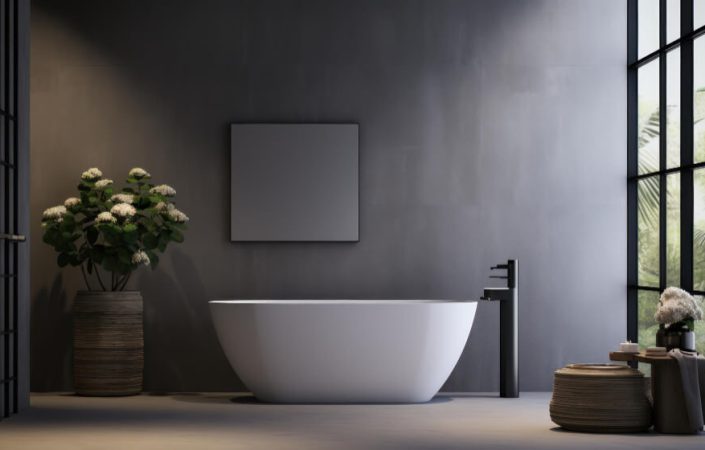
The modern bathroom has evolved far beyond its traditional role as a purely utilitarian space for quick daily washing routines. Today, homeowners increasingly view the bathroom as a personal sanctuary within the home, a dedicated retreat where they can recharge in the morning and unwind at the end of a long and demanding day. Creating a space that achieves this harmonious balance between daily practical necessity and spa-like luxury requires thoughtful planning, particularly when selecting the key fixtures and storage solutions. Investing in high-quality, beautifully designed bathroom furniture allows you to streamline your daily routines while elevating the entire aesthetic character of your living space. When every single element in the room is chosen with intention and crafted from premium, long-lasting materials, the end result is a serene, clutter-free environment that delivers genuine comfort and timeless satisfaction for years to come. Clever storage solutions that transform daily routines One of the most persistent and frustrating challenges in any modern household is managing the inevitable clutter that accumulates around the vanity area over time. From toiletries, skincare products, and cosmetics to spare towels, hairdryers, and cleaning supplies, an abundance of loose items can quickly make even a newly renovated room feel cramped, chaotic, and disorganized. Spacious vanity units featuring deep, fully extending drawers provide the ideal solution by keeping everyday essentials neatly concealed behind sleek and elegant cabinet fronts. Integrated drawer dividers, soft-close mechanisms, and internal power sockets elevate everyday convenience even further, enabling you to keep electric toothbrushes or grooming tools charged and ready entirely out of sight. By assigning a dedicated home to every single item, you preserve clean, open counter space, establishing a soothing atmosphere that makes every busy morning routine feel completely effortless. Materials engineered to withstand humid environments Bathrooms present a very unique set of environmental conditions that place demanding stress on furniture surfaces, hinges, and structural joints every single day. Constant exposure to atmospheric moisture, direct water splashes, and frequent temperature shifts means that standard furniture materials can quickly warp, swell at the seams, or lose their finish over time. Selecting purpose-built furniture crafted with moisture-resistant core materials, high-grade laminates, or durable lacquered finishes ensures that your investment remains in pristine condition over many years of heavy daily use. Beyond structural durability, high-performance surface treatments simplify routine cleaning and maintenance significantly. Smooth, non-porous finishes allow soap residue, water spots, and fingerprints to be wiped away effortlessly with a soft, damp cloth, keeping your entire room looking immaculate with minimal effort. Creating visual cohesion and a unified aesthetic Beyond practical storage and physical durability, well-chosen furniture plays a decisive role in defining the overall visual identity and atmosphere of your space. Whether your personal taste leans towards the warm, organic textures of Scandinavian-inspired oak finishes or the sharp, dramatic contrast of dark matte surfaces, cohesive design elements bind the room together into a harmonious whole. Coordinating the finishes, textures, and handling details across your vanity units, mirror frames, and tall storage cabinets creates a continuous, sophisticated design narrative throughout the space. When your furniture seamlessly complements your choice of brassware, wall coverings, and lighting fixtures, the bathroom transitions from a simple functional room into an elegant, luxurious extension of your personal interior style. The role of layered lighting Lighting plays a pivotal role in transforming a standard bathroom into a luxurious, inviting retreat. A single overhead light source often creates harsh shadows and an uninspiring ambient glow. To establish a truly versatile environment, designers recommend incorporating a layered approach that combines task, ambient, and accent lighting seamlessly throughout the space. Task lighting positioned around vanity mirrors ensures optimal visibility for precision routines such as grooming and applying cosmetics without casting unflattering shadows. Meanwhile, dimmable ambient lighting and subtle under-cabinet LED strips offer a gentle, warm illumination perfect for relaxing evening baths. Integrating smart lighting controls further allows homeowners to adjust color temperatures and brightness levels to match different times of day or specific moods effortless. Sustainable design and eco-conscious material choices As environmental responsibility becomes an increasingly central focus in modern interior architecture, sustainable bathroom design has shifted from a niche trend to an essential priority. Today's eco-friendly spaces prioritize water conservation, energy efficiency, and low-impact raw materials without compromising on style, aesthetic elegance, or long-term durability. Incorporating low-flow water fixtures, dual-flush toilets, and aerated faucets significantly lowers household water consumption without altering performance. Furthermore, choosing cabinetry crafted from sustainably sourced FSC-certified timber, recycled glass tiles, or eco-friendly composite surfaces ensures that your bathroom overhaul minimizes its environmental footprint while maintaining a polished, high-end appearance. Integrating smart technology for modern convenience The integration of intelligent technology is redefining how we experience convenience and comfort within personal wellness areas. From automated water temperature controls to touchless faucets and integrated digital interfaces, modern advancements bring unprecedented efficiency and personalization into daily home routines. Smart shower systems allow users to pre-program their ideal water temperature and spray settings via smartphone apps or voice commands, ensuring a customized experience every single time. Additionally, anti-fog heated mirrors, thermostatic floor heating, and bluetooth-enabled audio features convert ordinary mornings into luxurious, tailored spa experiences. In conclusion, designing a modern bathroom is an investment in both the practical functionality and the aesthetic value of your home. By thoughtfully integrating clever storage solutions, durable moisture-resistant materials, and a cohesive design language, you transform a daily utilitarian space into a personal wellness sanctuary. Prioritizing quality craftsmanship and timeless design elements ensures that your bathroom remains a source of comfort, elegance, and effortless convenience for many years to come.





Today’s Picks
Most Trending Topics
on The Daily Notes

Last Week’s Top Stories








We can make your creative dreams REAL
Write For Us Today!
- Drive organic traffic to your website from a global audience.
- Share your creative ideas with the world.
- Acquire high-quality links for your website and socials.